Colour Guide
Understanding RGB vs CMYK colour systems for perfect print results
RGB vs CMYK: What's the Difference?
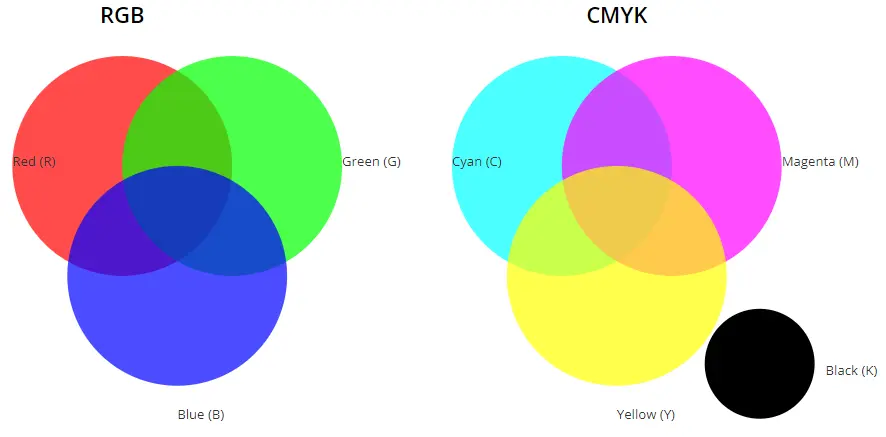
Understanding the difference between RGB and CMYK colour models
RGB (Red, Green, Blue)
Additive colour model for digital screens
How RGB Works
- •Additive Model: Colours are created by adding light
- •Used For: Computer screens, TVs, smartphones, digital cameras
- •Range: Can display millions of colours (16.7 million)
- •Brightness: White is created when all colours combine at full intensity
Best For: Web design, digital photography, video production, social media content
CMYK (Cyan, Magenta, Yellow, Key/Black)
Subtractive colour model for printing
How CMYK Works
- •Subtractive Model: Colours are created by subtracting light
- •Used For: Professional printing, magazines, brochures, business cards
- •Range: More limited colour gamut than RGB
- •Darkness: Black (Key) is added as the fourth ink for deeper blacks
Best For: Print materials, flyers, posters, business stationery, packaging
Quick Comparison
| Aspect | RGB | CMYK |
|---|---|---|
| Model Type | Additive | Subtractive |
| Primary Use | Digital Screens | Print Production |
| Colour Range | Wider (16.7M colours) | Narrower |
| Base | Black screen + light | White paper + ink |
| File Formats | JPG, PNG, GIF | PDF, AI, EPS |
⚠️ Important: Converting RGB to CMYK
When converting from RGB to CMYK for printing:
- •Colours may appear slightly different (less vibrant)
- •Always check your print preview before you approve it
- •Design in CMYK from the start if the final output is print
- •We print from CMYK and do not print Pantone spot colours. If your design uses a Pantone colour, we print its CMYK equivalent, which is a close rather than exact match.
✨ Presswift Recommendation
For best print results, always provide your files in CMYK format. Our design team can assist with colour conversion if needed.
Learn about your print preview →Ready to print?
Bring your colours to life. Order online.